Weather
Creates a button on the bar which displays the current weather condition and temperature. Clicking the button opens a popup with forecast information for the next few days.
Weather information is fetched from wttr.in via an external script. You will need to set up the script to be run as a service.
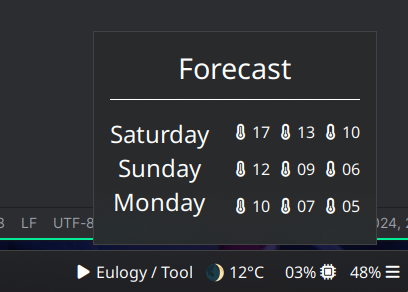
Configuration
let { $weather = { type = "custom" class = "weather"
bar = [ { type = "button" label = "#weather_current" on_click = "popup:toggle" } ] popup = [ { type = "box" orientation = "vertical"
widgets = [ { type = "label" name = "header" label = "Forecast" } { type = "box" widgets = [ { type = "box" name="dates" orientation = "vertical" widgets = [ { type = "label" class="weather-date" label = "#weather_date_0" } { type = "label" class="weather-date" label = "#weather_date_1" } { type = "label" class="weather-date" label = "#weather_date_2" } ]} { type = "box" name="temps" orientation = "vertical" widgets = [ { type = "box" widgets = [ { type = "label" class="weather-high" label = " #weather_high_0" } { type = "label" class="weather-avg" label = " #weather_avg_0" } { type = "label" class="weather-low" label = " #weather_low_0" } ] } { type = "box" widgets = [ { type = "label" class="weather-high" label = " #weather_high_1" } { type = "label" class="weather-avg" label = " #weather_avg_1" } { type = "label" class="weather-low" label = " #weather_low_1" } ] } { type = "box" widgets = [ { type = "label" class="weather-high" label = " #weather_high_2" } { type = "label" class="weather-avg" label = " #weather_avg_2" } { type = "label" class="weather-low" label = " #weather_low_2" } ] } ] } ] } ] } ] }} in { end = [ $weather ]}{ "end": [ { "type": "custom", "class": "weather", "bar": [ { "type": "button", "label": "#weather_current", "on_click": "popup:toggle" } ], "popup": [ { "type": "box", "orientation": "vertical", "widgets": [ { "type": "label", "name": "header", "label": "Forecast" }, { "type": "box", "widgets": [ { "type": "box", "name": "dates", "orientation": "vertical", "widgets": [ { "type": "label", "class": "weather-date", "label": "#weather_date_0" }, { "type": "label", "class": "weather-date", "label": "#weather_date_1" }, { "type": "label", "class": "weather-date", "label": "#weather_date_2" } ] }, { "type": "box", "name": "temps", "orientation": "vertical", "widgets": [ { "type": "box", "widgets": [ { "type": "label", "class": "weather-high", "label": " #weather_high_0" }, { "type": "label", "class": "weather-avg", "label": " #weather_avg_0" }, { "type": "label", "class": "weather-low", "label": " #weather_low_0" } ] }, { "type": "box", "widgets": [ { "type": "label", "class": "weather-high", "label": " #weather_high_1" }, { "type": "label", "class": "weather-avg", "label": " #weather_avg_1" }, { "type": "label", "class": "weather-low", "label": " #weather_low_1" } ] }, { "type": "box", "widgets": [ { "type": "label", "class": "weather-high", "label": " #weather_high_2" }, { "type": "label", "class": "weather-avg", "label": " #weather_avg_2" }, { "type": "label", "class": "weather-low", "label": " #weather_low_2" } ] } ] } ] } ] } ] } ]}end: - type: custom class: weather bar: - type: button label: "#weather_current" on_click: popup:toggle popup: - type: box orientation: vertical widgets: - type: label name: header label: Forecast - type: box widgets: - type: box name: dates orientation: vertical widgets: - type: label class: weather-date label: "#weather_date_0" - type: label class: weather-date label: "#weather_date_1" - type: label class: weather-date label: "#weather_date_2" - type: box name: temps orientation: vertical widgets: - type: box widgets: - type: label class: weather-high label: " #weather_high_0" - type: label class: weather-avg label: " #weather_avg_0" - type: label class: weather-low label: " #weather_low_0" - type: box widgets: - type: label class: weather-high label: " #weather_high_1" - type: label class: weather-avg label: " #weather_avg_1" - type: label class: weather-low label: " #weather_low_1" - type: box widgets: - type: label class: weather-high label: " #weather_high_2" - type: label class: weather-avg label: " #weather_avg_2" - type: label class: weather-low label: " #weather_low_2"[[end]]type = "custom"class = "weather"
[[end.bar]] type = "button" label = "#weather_current" on_click = "popup:toggle"
[[end.popup]] type = "box" orientation = "vertical"
[[end.popup.widgets]] type = "label" name = "header" label = "Forecast"
[[end.popup.widgets]] type = "box"
[[end.popup.widgets.widgets]] type = "box" name = "dates" orientation = "vertical"
[[end.popup.widgets.widgets.widgets]] type = "label" class = "weather-date" label = "#weather_date_0"
[[end.popup.widgets.widgets.widgets]] type = "label" class = "weather-date" label = "#weather_date_1"
[[end.popup.widgets.widgets.widgets]] type = "label" class = "weather-date" label = "#weather_date_2"
[[end.popup.widgets.widgets]] type = "box" name = "temps" orientation = "vertical"
[[end.popup.widgets.widgets.widgets]] type = "box"
[[end.popup.widgets.widgets.widgets.widgets]] type = "label" class = "weather-high" label = " #weather_high_0"
[[end.popup.widgets.widgets.widgets.widgets]] type = "label" class = "weather-avg" label = " #weather_avg_0"
[[end.popup.widgets.widgets.widgets.widgets]] type = "label" class = "weather-low" label = " #weather_low_0"
[[end.popup.widgets.widgets.widgets]] type = "box"
[[end.popup.widgets.widgets.widgets.widgets]] type = "label" class = "weather-high" label = " #weather_high_1"
[[end.popup.widgets.widgets.widgets.widgets]] type = "label" class = "weather-avg" label = " #weather_avg_1"
[[end.popup.widgets.widgets.widgets.widgets]] type = "label" class = "weather-low" label = " #weather_low_1"
[[end.popup.widgets.widgets.widgets]] type = "box"
[[end.popup.widgets.widgets.widgets.widgets]] type = "label" class = "weather-high" label = " #weather_high_2"
[[end.popup.widgets.widgets.widgets.widgets]] type = "label" class = "weather-avg" label = " #weather_avg_2"
[[end.popup.widgets.widgets.widgets.widgets]] type = "label" class = "weather-low" label = " #weather_low_2"Script
Run the following script on a timer. Ensure to fill out your city name.
#!/usr/bin/env zx
const location = "Canterbury";
 // JS uses Sunday as first dayconst weekday = ["Sunday","Monday","Tuesday","Wednesday","Thursday","Friday","Saturday"];
// bar logicconst data = await fetch(`https://wttr.in/${location}?format=%c %t|%m %t|%S|%s`)  .then(r => r.text());
const [day, night, sunrise, sunset] = data.replaceAll("+", "").split("|");const [sunriseH, sunriseM, sunriseS] = sunrise.split(":");const [sunsetH, sunsetM, sunsetS] = sunset.split(":");
const currentTime = new Date();
const sunriseTime = new Date(currentTime);sunriseTime.setHours(sunriseH);sunriseTime.setMinutes(sunriseM);sunriseTime.setSeconds(sunriseS);
const sunsetTime = new Date(currentTime);sunsetTime.setHours(sunsetH);sunsetTime.setMinutes(sunsetM);sunsetTime.setSeconds(sunsetS);
let value = day;if(currentTime < sunriseTime || currentTime > sunsetTime) value = night;
await $`ironbar set weather_current ${value}`;
// popup logic
const forecast = await fetch(`https://wttr.in/${location}?format=j1`).then(r => r.json());
for (const i in forecast.weather) {  const report = forecast.weather[i];
  const day = weekday[new Date(report.date).getDay()];
  await $`ironbar set weather_date_${i} ${day}`;  await $`ironbar set weather_avg_${i} ${report.avgtempC.padStart(2, "0")}`;  await $`ironbar set weather_high_${i} ${report.maxtempC.padStart(2, "0")}`;  await $`ironbar set weather_low_${i} ${report.mintempC.padStart(2, "0")}`;}
Styling
.popup-weather #header {    font-size: 1.8em;    padding-bottom: 0.4em;    margin-bottom: 0.6em;    border-bottom: 1px solid @color-border;}
.popup-weather .weather-date {    font-size: 1.5em;    padding-right: 1em;}
.popup-weather .weather-avg {    margin-left: 0.5em;    margin-right: 0.5em;}
/* this is a hack to align the different font sizes on left/right you may need to adjust for different fonts*/.popup-weather #temps label {    padding-top: 0.2em;    margin-bottom: 0.7em;}