Launcher
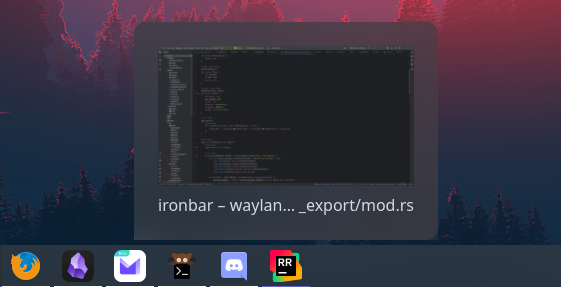
Windows-style taskbar that displays running windows, grouped by program. Hovering over a program with multiple windows open shows a popup with each window. Left clicking an icon/popup item focuses the program if it has any open instances or otherwise launches a new instance of the program. Middle clicking an icon always launches a new instance of the program. Optionally displays a launchable set of favourites.
Configuration
Type:
launcher
| Type | Default | Description | |
|---|---|---|---|
favorites | string[] | [] | List of app IDs (or classes) to always show at the start of the launcher. |
show_names | boolean | false | Whether to show app names on the button label. Names will still show on tooltips when set to false. |
show_icons | boolean | true | Whether to show app icons on the button. |
icon_size | integer | 32 | Size to render icon at (image icons only). |
launch_command | string | gtk-launch {app_name} | Command used to launch applications. |
reversed | boolean | false | Whether to reverse the order of favorites/items |
minimize_focused | boolean | true | Whether to minimize a focused window when its icon is clicked. Only minimizes single windows. |
truncate.mode | 'start' or 'middle' or 'end' or off | end | Location of the ellipses and where to truncate text from. Applies to application names when show_names is enabled. |
truncate.length | integer | null | Fixed width (in chars) of the widget. Leave blank to let GTK automatically handle. |
truncate.max_length | integer | null | Maximum number of characters before truncating. Leave blank to let GTK automatically handle. |
truncate_popup.mode | 'start' or 'middle' or 'end' or off | middle | Location of the ellipses and where to truncate text from. Applies to window names within a group popup. |
truncate_popup.length | integer | null | Fixed width (in chars) of the widget. Leave blank to let GTK automatically handle. |
truncate_popup.max_length | integer | 25 | Maximum number of characters before truncating. Leave blank to let GTK automatically handle. |
page_size | integer | 1000 | Number of items to show on a page. When the number of items is reached, controls appear which can be used to move forward/back through the list of items. |
icons.page_back | string or image | | Icon to show for page back button. |
icons.page_forward | string or image | | Icon to show for page forward button. |
JSON
{ "start": [ { "type": "launcher", "favourites": [ "firefox", "discord" ], "show_names": false, "show_icons": true, "reversed": false } ]}TOML
[[start]]type = "launcher"favorites = ["firefox", "discord"]show_names = falseshow_icons = truereversed = falseYAML
start: - type: "launcher" favorites: - firefox - discord show_names: false show_icons: true reversed: falseCorn
{ start = [ { type = "launcher" favorites = [ "firefox" "discord" ] show_names = false show_icons = true reversed = false } ]}{ "start": [ { "type": "launcher", "favorites": [ "firefox", "discord" ], "show_names": false, "show_icons": true, "reversed": false } ]}start: - type: launcher favorites: - firefox - discord show_names: false show_icons: true reversed: false[[start]]type = "launcher"favorites = [ "firefox", "discord" ]show_names = falseshow_icons = truereversed = falseStyling
| Selector | Description |
|---|---|
.launcher | Launcher widget box |
.launcher .item | App button |
.launcher .item.open | App button (open app) |
.launcher .item.focused | App button (focused app) |
.launcher .item.urgent | App button (urgent app) |
.launcher .pagination | Pagination controls box |
.launcher .pagination .btn-back | Pagination back button |
.launcher .pagination .btn-forward | Pagination forward button |
.popup-launcher | Popup container |
.popup-launcher .popup-item | Window button in popup |
For more information on styling, please see the styling guide.