Clipboard
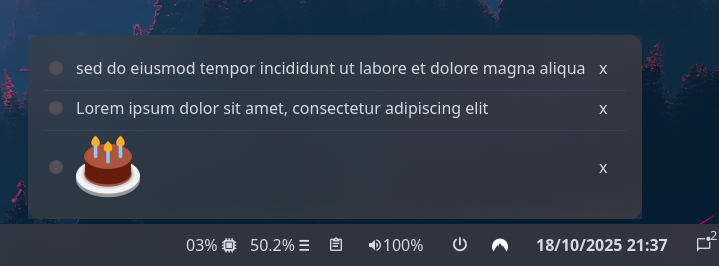
Shows recent clipboard items, allowing you to switch between them to re-copy previous values. Clicking the icon button opens the popup containing all functionality.
Supports plain text and images.
Configuration
Type:
clipboard
| Name | Type | Default | Description |
|---|---|---|---|
icon | string or image | | Icon to show on the widget button. |
icon_size | integer | 32 | Size to render icon at (image icons only). |
max_items | integer | 10 | Maximum number of items to show in the popup. |
image_max_width | float | 256.0 | The maximum width to render copied images at. |
image_max_height | float | 64.0 | The maximum height to render copied images at. |
truncate | 'start' or 'middle' or 'end' or off or Map | off | The location of the ellipses and where to truncate text from. Leave null to avoid truncating. Use the long-hand Map version if specifying a length. |
truncate.mode | 'start' or 'middle' or 'end' or off | off | The location of the ellipses and where to truncate text from. Leave null to avoid truncating. |
truncate.length | integer | null | The fixed width (in chars) of the widget. Leave blank to let GTK automatically handle. |
truncate.max_length | integer | null | The maximum number of characters before truncating. Leave blank to let GTK automatically handle. |
JSON
{ "end": { "type": "clipboard", "max_items": 3, "truncate": { "mode": "end", "length": 50 } }}TOML
[[end]]type = "clipboard"max_items = 3
[end.truncate]mode = "end"length = 50
YAML
end: - type: 'clipboard' max_items: 3 truncate: mode: 'end' length: 50Corn
{ end = [ { type = "clipboard" max_items = 3 truncate.mode = "end" truncate.length = 50 } ]}{ "end": [ { "type": "clipboard", "max_items": 3, "truncate": { "mode": "end", "length": 50 } } ]}end: - type: clipboard max_items: 3 truncate: mode: end length: 50[[end]]type = "clipboard"max_items = 3
[end.truncate] mode = "end" length = 50Styling
| Selector | Description |
|---|---|
.clipboard | Clipboard widget. |
.clipboard .btn | Clipboard widget button. |
.clipboard .btn .icon | Clipboard widget button icon (any type). |
.clipboard .btn .text-icon | Clipboard widget button icon (textual only). |
.clipboard .btn .image | Clipboard widget button icon (image only). |
.popup-clipboard | Clipboard popup box. |
.popup-clipboard .item | Clipboard row item inside the popup. |
.popup-clipboard .item .btn | Clipboard row item radio button. |
.popup-clipboard .item .btn.text | Clipboard row item radio button (text values only). |
.popup-clipboard .item .btn.image | Clipboard row item radio button (image values only). |
.popup-clipboard .item .btn-remove | Clipboard row item remove button. |
For more information on styling, please see the styling guide.