Menu
Application menu that shows installed programs and optionally custom entries.
This works by reading all .desktop files on the system.
Clicking the menu button will open the main menu. Clicking on any application category will open a sub-menu with any installed applications that match.
It is also possible to add custom categories and actions into the menu.
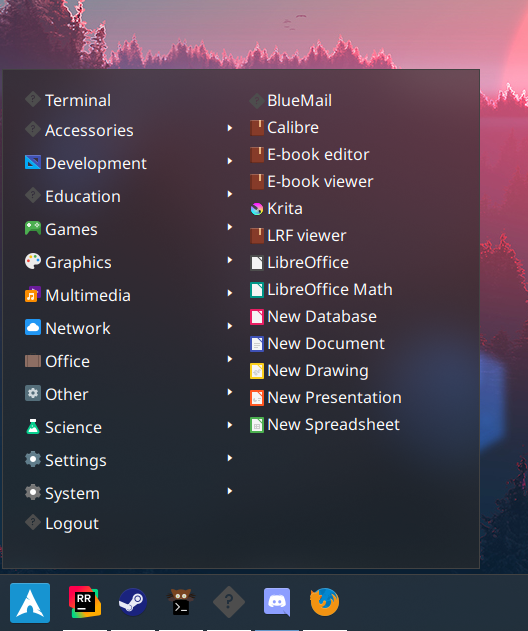
Configuration
| Type | Default | Description | |
|---|---|---|---|
start | MenuEntry[] | [] | Items to add to the start of the main menu. |
center | MenuEntry[] | Default XDG menu | Items to add to the centre of the main menu. By default this shows a number of XDG entries that should cover all common applications. |
end | MenuEntry[] | [] | Items to add to the end of the main menu. |
height | integer | null | Height of the menu. Leave null to resize dynamically. |
width | integer | null | Width of the menu. Leave null to resize dynamically. |
label | string | ≡ | Label to show on the menu button on the bar. |
label_icon | string | null | Icon to show on the menu button on the bar. |
label_icon_size | integer | 16 | Size of the label_icon image. |
launch_command | string | gtk-launch {app_name} | Command used to launch applications. |
truncate | 'start' or 'middle' or 'end' or off or Map | off | Applies to popup. The location of the ellipses and where to truncate text from. Leave null to avoid truncating. Use the long-hand Map version if specifying a length. |
truncate.mode | 'start' or 'middle' or 'end' or off | off | Applies to popup. The location of the ellipses and where to truncate text from. Leave null to avoid truncating. |
truncate.length | integer | null | Applies to popup. The fixed width (in chars) of the widget. Leave blank to let GTK automatically handle. |
truncate.max_length | integer | null | Applies to popup. The maximum number of characters before truncating. Leave blank to let GTK automatically handle. |
MenuEntry
Each entry can be one of three types:
xdg_entry- Contains all applications matching the configuredcategories.xdg_other- Contains all applications not covered byxdg_entrycategories.custom- Individual shell command entry.
| Type | Default | Description | |
|---|---|---|---|
type | xdg_entry or xdg_other or custom | Type of the entry. | |
label | string | '' | Label of the entry’s button. |
icon | string | null | Icon for the entry’s button. |
categories | string[] | [] | [xfg_entry] List of freedesktop.org categories to include in this entry’s sub menu . |
on_click | string | '' | [custom] Shell command to execute when the entry’s button is clicked |
Default XDG Menu
Setting the center menu entries will override the default menu.
The default menu can be found in the default example files here.
JSON
{ "start": [ { "type": "menu", "start": [ { "type": "custom", "label": "Terminal", "on_click": "xterm" } ], "height": 440, "width": 200, "icon": "archlinux", "label": null } ]}TOML
[[start]]type = "memu"height = 400width = 200icon = "archlinux"
[[start.start]]type = "custom"label = "Terminal"on_click = "xterm"
YAML
start: - type: "menu" start: - type: custom label: Terminal on_click: xterm height: 440 width: 200 icon: archlinux label: nullCorn
{ start = [ { type = "menu" start = [ { type = "custom" label = "Terminal" on_click = "xterm" } ] height = 440 width = 200 icon = "archlinux" label = null } ]}{ "start": [ { "type": "menu", "start": [ { "type": "custom", "label": "Terminal", "on_click": "xterm" } ], "height": 440, "width": 200, "icon": "archlinux", "label": null } ]}start: - type: menu start: - type: custom label: Terminal on_click: xterm height: 440 width: 200 icon: archlinux label: null[[start]]type = "menu"height = 440width = 200icon = "archlinux"
[[start.start]] type = "custom" label = "Terminal" on_click = "xterm"Styling
| Selector | Description |
|---|---|
.menu | Menu button |
.popup-menu | Main container of the popup |
.popup-menu .main | Main menu of the menu |
.popup-menu .main .category | Category button |
.popup-menu .main .category.open | Open category button |
.popup-menu .main .main-start | Container for start entries |
.popup-menu .main .main-center | Container for center entries |
.popup-menu .main .main-end | Container for end entries |
.popup-menu .sub-menu | All sub-menus |
.popup-menu .sub-menu .application | Application button within submenu |
For more information on styling, please see the styling guide.