Clock
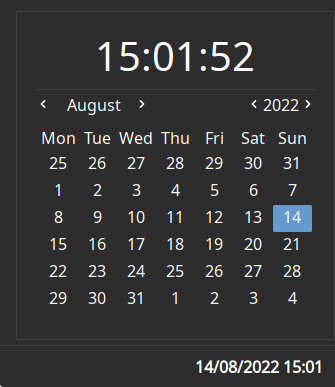
Displays the current date and time. Clicking on the widget opens a popup with the time and a calendar.
Configuration
Type:
clock
| Name | Type | Default | Description |
|---|---|---|---|
format | string | %d/%m/%Y %H:%M | Date/time format string. Pango markup is supported. |
format_popup | string | %H:%M:%S | Date/time format string to display in the popup header. Pango markup is supported. |
locale | string | $LC_TIME or $LANG or 'POSIX' | Locale to use (eg en_GB). Defaults to the system language (reading from env var). |
orientation | 'horizontal' or 'vertical' (shorthand: 'h' or 'v') | 'horizontal' | Orientation of the time on the clock button. |
Detail on available tokens can be found here: https://docs.rs/chrono/latest/chrono/format/strftime/index.html
JSON
{ "end": [ { "type": "clock", "format": "%d/%m/%Y %H:%M" } ]}TOML
[[end]]type = "clock"format = "%d/%m/%Y %H:%M"YAML
end: - type: "clock" format: "%d/%m/%Y %H:%M"Corn
{ end = [ { type = "clock" format = "%d/%m/%Y %H:%M" } ]}{ "end": [ { "type": "clock", "format": "%d/%m/%Y %H:%M" } ]}end: - type: clock format: "%d/%m/%Y %H:%M"[[end]]type = "clock"format = "%d/%m/%Y %H:%M"Styling
| Selector | Description |
|---|---|
.clock | Clock widget button |
.popup-clock | Clock popup box |
.popup-clock .calendar-clock | Clock inside the popup |
.popup-clock .calendar | Calendar widget inside the popup. GTK provides some OOTB styling options for this. |
For more information on styling, please see the styling guide.